From image to delivery
Photorealistic rendering: 10 keys to make it look like a photo
Directional light, contact shadows, imperfect materials, scale, camera and context: the ten keys of a render that looks like a photo and how to ask AI for them.
What a photorealistic render is
A photorealistic render is a computer-generated image that cannot be told apart from a photograph. It does not depend on resolution or software: it depends on light, materials, scale and camera behaving as they do in a real photo. When one of them fails, the eye notices even if it cannot say what.
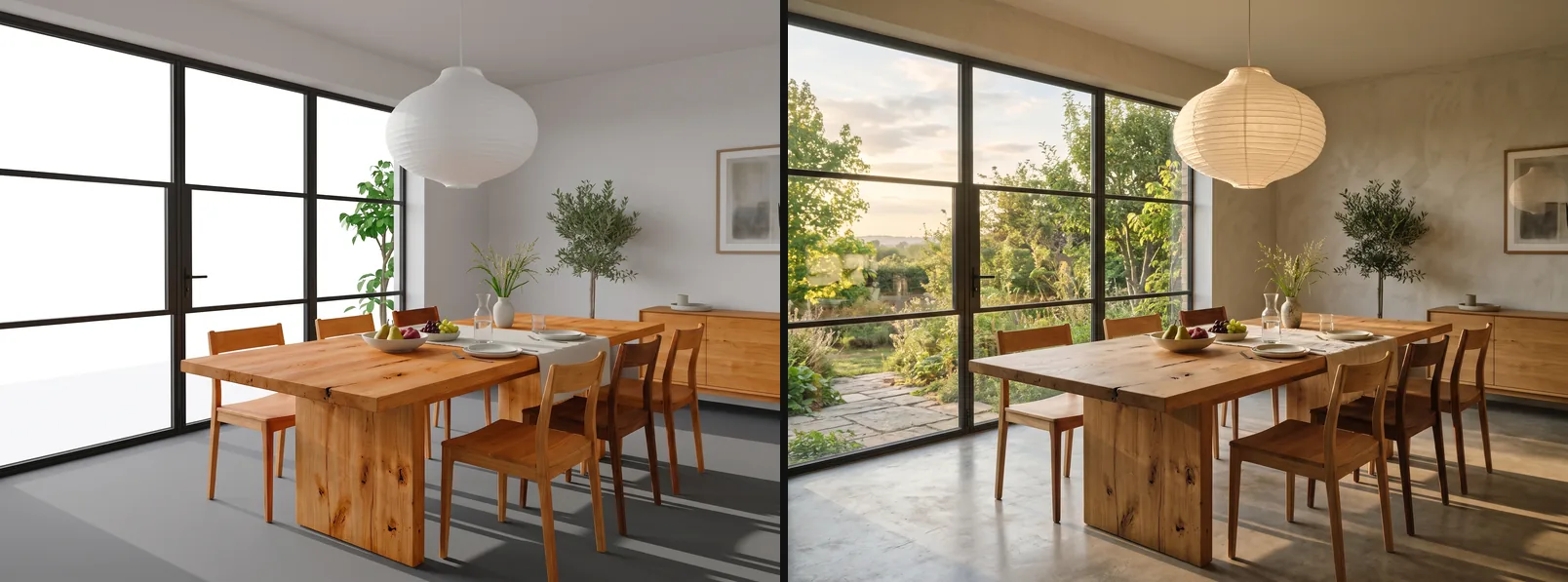
Keys 1 and 2: light and shadow
One dominant, directional light. A window or the sun, and every shadow falling the same way. Flat light coming from everywhere is the first thing that gives a render away.
Soft shadows with contact. Where furniture touches the floor there is a small, dark shadow. Without it, objects float.
Keys 3 and 4: materials
Materials with imperfection. Grain that does not repeat, irregular joints, a slight colour variation on the floor. Absolute perfection does not exist in a photo.
Reflections that fit the material. Polished marble reflects, oiled oak barely, lime plaster not at all. If everything shines the same, it looks like plastic.
Keys 5 to 7: scale and camera
Believable scale. Doors at 2.10 m, worktops at 90 cm, chairs at the right height. A scale error is noticed before a texture error.
Camera at eye level. Between 1.50 and 1.70 m and with vertical lines straight, as an architectural photographer would. More in where to place the camera.
A photographer’s lens. Between 24 and 35 mm equivalent focal length. An extreme wide angle distorts the edges and gives the image away.
Keys 8 to 10: context, colour and life
Context through the window. A garden, a street, another building. A blown-out white window or an empty sky says «this is a model».
Restrained colour and exposure. Neutral whites, no oversaturation and no blown highlights. Real photos rarely have catalogue colours.
Life, but not much. An open book, a throw, a plant. Just enough for the space to feel lived in without turning it into a set.
How to get there with AI
With an AI-generated render, half of the keys come from the starting image and the other half from the description. In Photo to render it works like this:
Start from a good base. A photo or screenshot with the camera well placed (keys 6 and 7). Geometry and framing are kept.
Ask for directional light. For example: «late-afternoon natural side light through the window, soft shadows in one direction» (keys 1 and 2).
Name the materials and their finish. «Grained oak, microcement with slight variations, textured lime plaster wall» instead of «wood, grey floor, white wall» (keys 3 and 4).
Describe what is outside. «A garden with greenery beyond the window» (key 8).
Generate options and fix by area. Pick the best and fix what is off with edit render. Upscale to 4K only at the end.